
Guidelines for Preparing Digital Poster
Both Spotlight Session presentations and digital poster presentations (viewing only) at this Annual Meeting will use the digital poster format.
Please note that printed posters will not be displayed on poster panels.
Advance Registration of Presentation Files
Advance registration of presentation files is required for both Spotlight Sessions and digital posters. Please note that your abstract will be withdrawn if your participant registration and presentation file registration are not completed by the deadlines.
Registered presentation files will be available for viewing at the following locations during and after the meeting.
Viewing Locations
- Spotlight Session Venue
(The Prince Sakura Tower Tokyo, 2F, Conference Floor N5–9, S5–9) - Exhibition Area
(Grand Prince Hotel Shin Takanawa, International Convention Center PAMIR, 3F, Keiun, Hakuun, and Suiun) - Grand Prince Hotel Shin Takanawa, International Convention Center PAMIR, 1F and 2F Lobbies
1. Preparing Presentation Files
Accepted File Formats
Microsoft PowerPoint (.pptx/.ppt) or PDF
Recommended Versions:
Windows: PowerPoint 2024/365
Mac: PowerPoint 2024/365
* Earlier versions may cause text misalignment or other formatting issues.
* If you use software other than Microsoft PowerPoint (such as Keynote), please convert your file to PowerPoint or PDF format before registration.
* If converting your file to PowerPoint or PDF format causes garbled text or other character display issues, please do not register the file through the system. Instead, contact the Technical Support Desk.
Slide Size and Orientation
Recommended size: Widescreen (16:9), portrait orientation.
Please ensure that your presentation file is created in portrait orientation, not landscape orientation.
To set the slide size in Microsoft PowerPoint, go to the "Design" tab, select "Customize," and then "Slide Size."

Fonts
Please use standard fonts provided with your operating system.
Japanese: MS Gothic, MS PGothic, MS Mincho, MS PMincho, Meiryo, Yu Gothic, Yu Mincho
English: Times New Roman, Arial, Arial Black, Arial Narrow, Century, Century Gothic, Courier, Courier New, Georgia
* Special fonts may be replaced with standard fonts, which could result in text misalignment or garbled characters.
File Size
Please prepare a single portrait-oriented slide with a maximum file size of 500 MB.
Audio and Video
Audio and video files cannot be used.
If your registered file contains audio or video, these elements will be disabled.
PowerPoint Animations
Animations cannot be used.
If your registered file contains animations, they will be disabled.
File Name
There are no specific requirements for file names.
(The system will automatically convert the file name of your registered presentation file.)
Conflict of Interest (COI) Disclosure
Presenters are required to disclose any conflicts of interest covering the period from three years before the abstract registration date through the presentation date.
Please include one of the following statements at the bottom of your presentation file.
Examples of Conflict of Interest (COI) Disclosure Statements
- There are no companies with conflicts of interest to disclose in relation to this presentation.
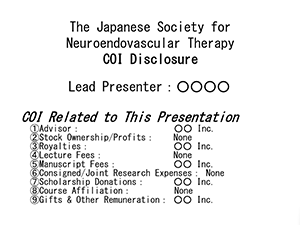
- Conflicts of interest to disclose in relation to this presentation: ○ Company (lecture fees, etc.), ○ Company (research funding), ○ Company (donations).
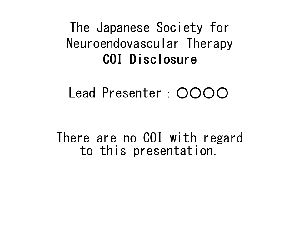
Alternatively, you may include the information shown in the reference slide below in your presentation poster.
NO COI Discloser
COI Disclosure
Virus Scan
Please ensure that your presentation file has been scanned for viruses.
Advance Registration Period for Presentation Files
October 20, 2026 (Tuesday), 12:00 noon – November 6, 2026 (Friday), 17:00
2. How to Register Presentation Files
Please access the presentation file registration website using the button below and log in with your registration ID and password.
Your registration ID and password are provided in the notification email sent by the Secretariat.
If you have not received the notification email, please contact the Secretariat at jsnet2026@convex.co.jp.
3. Inquiries Regarding Presentation File Registration
If you have any questions, please contact the Secretariat by email using the contact details below.
Inquiries Regarding Login IDs, Passwords, and Other Matters
Secretariat of the 42nd Annual Meeting of the Japanese Society for Neuroendovascular Therapy
Convex Co., Ltd.
E-mail:jsnet2026@convex.co.jp
Technical Support Inquiries
Technical Support Desk of the 42nd Annual Meeting of the Japanese Society for Neuroendovascular Therapy
Weekdays: 10:00–17:30 (excluding Saturdays, Sundays, and public holidays)
E-mail:jsnet2026-support@mail.mice-one.co.jp
Instructions for Spotlight Session Presentations
Spotlight Session presenters are requested to arrive at their presentation venue at least 15 minutes before the start of their scheduled session.
Each presentation booth will be equipped with a tablet on a stand. Presenters are required to operate the tablet themselves. The system includes a pointer function and features for displaying abstract and author information.
Please strictly adhere to your allotted presentation time.
| Presentation Time | 4 minutes for presentation and 2 minutes for Q&A (6 minutes in total) |
|---|
A countdown will begin on the presenter's tablet screen when the presentation starts. A bell will sound on the tablet at the following times:
- 1 minute before the end of the allotted time
- At the end of the allotted time
- 30 seconds after the allotted time has elapsed
Important Notes for Spotlight Session Presentations
No operators will be assigned to the presentation booths.
Only presentation files registered in advance may be used. Presenters will not be permitted to use their own laptops or other devices on the day of their presentation.
